Bringing Runtime Power Management to the Raspberry Pi GPU
Date:
As part of Igalia’s collaboration with Raspberry Pi, I have previously blogged about several improvements we landed for the Broadcom VideoCore GPU (known as V3D), with the goal of extracting the best possible performance from the hardware. However, performance is not the whole story. On embedded devices, power consumption is just as important: reducing unnecessary activity helps lower heat generation, improve energy efficiency, and preserve performance over time by avoiding thermal throttling.
That is why, over the last few months, we have been working on adding Runtime Power Management support to the upstream V3D DRM driver, allowing the GPU to be powered and clocked according to its actual usage.
Why Runtime Power Management?
In the Linux kernel, Runtime Power Management (known as Runtime PM) is the mechanism that allows individual devices to be suspended and resumed dynamically while the system as a whole remains running. Instead of keeping a device fully powered all the time, the kernel can put the device into a low-power state when it is idle and bring it back when it is needed again.
In the graphics context, it is easy to see why runtime PM can be useful. A GPU is not necessarily active all the time: it may be heavily used while rendering a scene, but remain idle for long periods afterwards. If the driver keeps the GPU clocked during those idle periods, the system keeps spending energy on a block that is not doing useful work at all.
For embedded platforms, this is even more pressing. Reducing unnecessary power consumption helps decrease heat generation and improve overall energy efficiency. Even if the board is not battery-powered, avoiding needless power usage can reduce the need for cooling and leave more thermal budget available for other blocks.
The Problem: an idle GPU with an enabled clock
Until now, the V3D driver had a very simple power model: the GPU clock was enabled during probe and remained enabled for the entire lifetime of the driver. In practice, this meant that once the driver was loaded, the V3D clock stayed on until the driver was removed, regardless of whether the GPU was actively executing jobs. This was simple and functional, but it meant that an idle GPU was not idle from a power-management point of view.
On Raspberry Pi platforms, this is easy to observe with vcgencmd. Even with no GPU workload running, the V3D clock would still report an enabled frequency:
$ vcgencmd measure_clock v3d
frequency(0)=960016128
If the GPU is idle, the driver should be able to let the hardware become idle as well. Runtime PM provides the kernel infrastructure for that, but enabling it in the V3D driver required a bit more than simply adding suspend and resume callbacks.
Making the Raspberry Pi firmware clocks obey
At first glance, adding Runtime PM to V3D might look like a driver-local change, but in practice, things were a bit more subtle.
On Raspberry Pi platforms, some clocks are managed by the Raspberry Pi firmware. From the V3D driver’s point of view, this is supposed to be mostly transparent: the driver uses the standard Linux clock framework, and the clock provider takes care of talking to the firmware underneath. However, this abstraction only works if calls to clk_prepare_enable() and clk_disable_unprepare() are translated into actual firmware requests to enable and disable the clock.
Surprisingly, that was not happening. The Raspberry Pi firmware clock driver did not implement the prepare/unprepare hooks, so these calls did not actually ask the firmware to enable or disable the clock. We fixed that by translating the common clock framework operations into the corresponding Raspberry Pi firmware commands [1][2][3].
However, there was still one firmware-specific caveat: on current firmware versions, RPI_FIRMWARE_SET_CLOCK_STATE does not fully power off the clock as expected. To work around this limitation and achieve meaningful power savings, the clock rate also needs to be set to the minimum before disabling the clock. This behavior may change in future firmware releases, but for now the clock driver needs to account for it explicitly.
With the firmware clock limitation addressed, the V3D driver could start relying on the usual kernel clock APIs as part of its Runtime PM flow. The next step was to reorganize the driver so that powering the GPU up and down became part of its operation.
Introducing Runtime PM to V3D
With the clock side behaving as expected, we could move the V3D driver itself to a Runtime PM model [7][8][9].
This required a small refactor of the probe path to separate power-independent setup from GPU-powered initialization. Resources that do not require the GPU to be powered are allocated during probe, while any initialization that depends on the GPU being clocked is handled during runtime resume. Runtime suspend then disables the clock again when the device becomes idle. The resulting flow is simple:
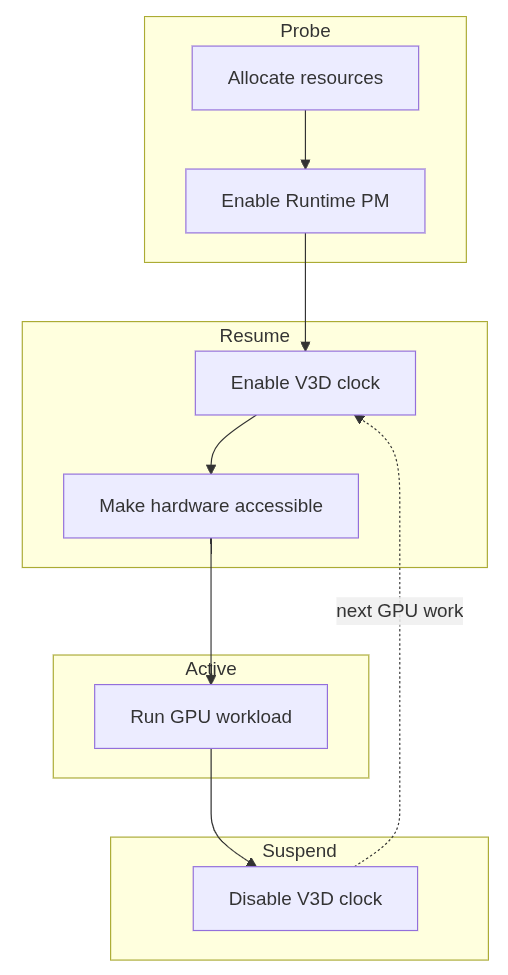
With that in place, the change becomes visible from userspace. While a GPU workload such as glmark2 is running, the V3D clock is enabled:
$ vcgencmd measure_clock v3d
frequency(0)=960016128
After the workload finishes and the GPU becomes idle, the clock can drop back to zero:
$ vcgencmd measure_clock v3d
frequency(0)=0
This is the behavior we wanted: the GPU remains available when there is work to do, but it no longer keeps its clock enabled while idle.
Results
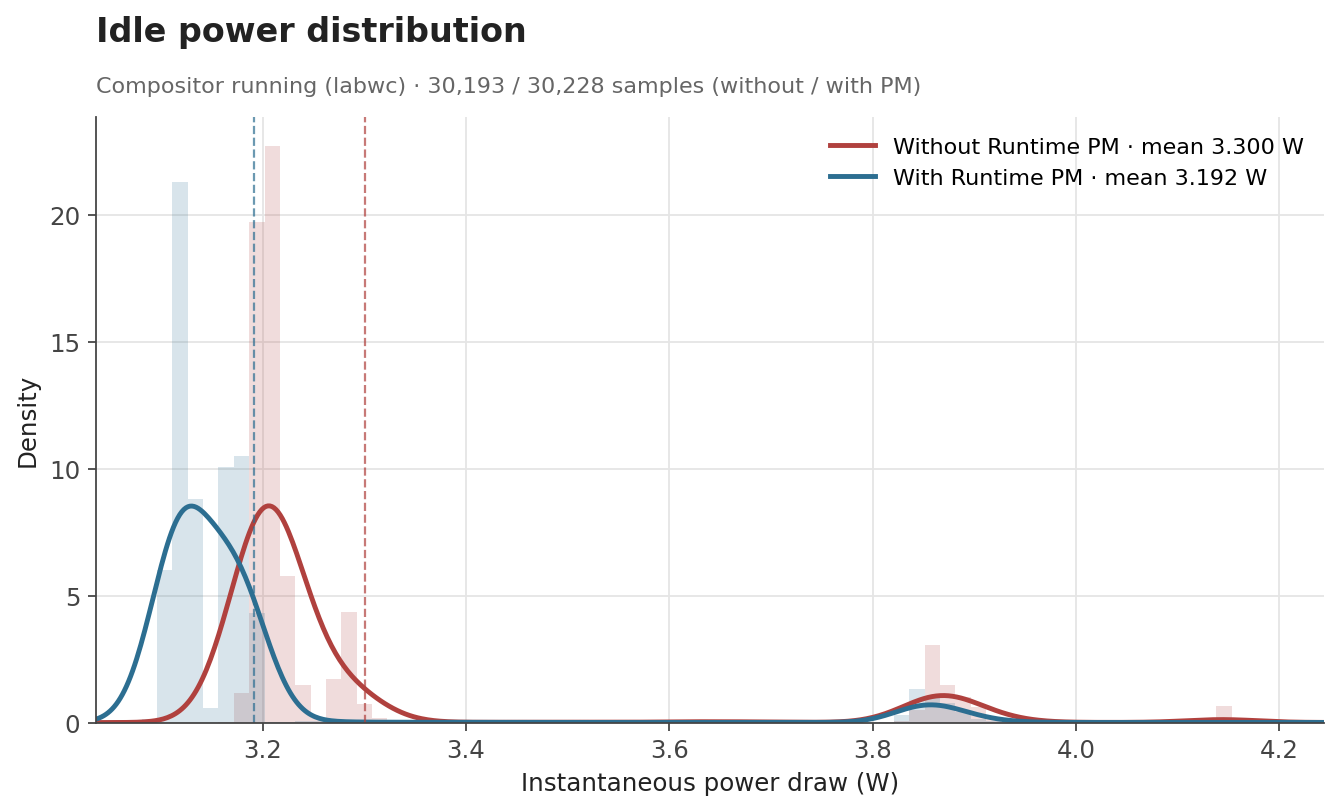
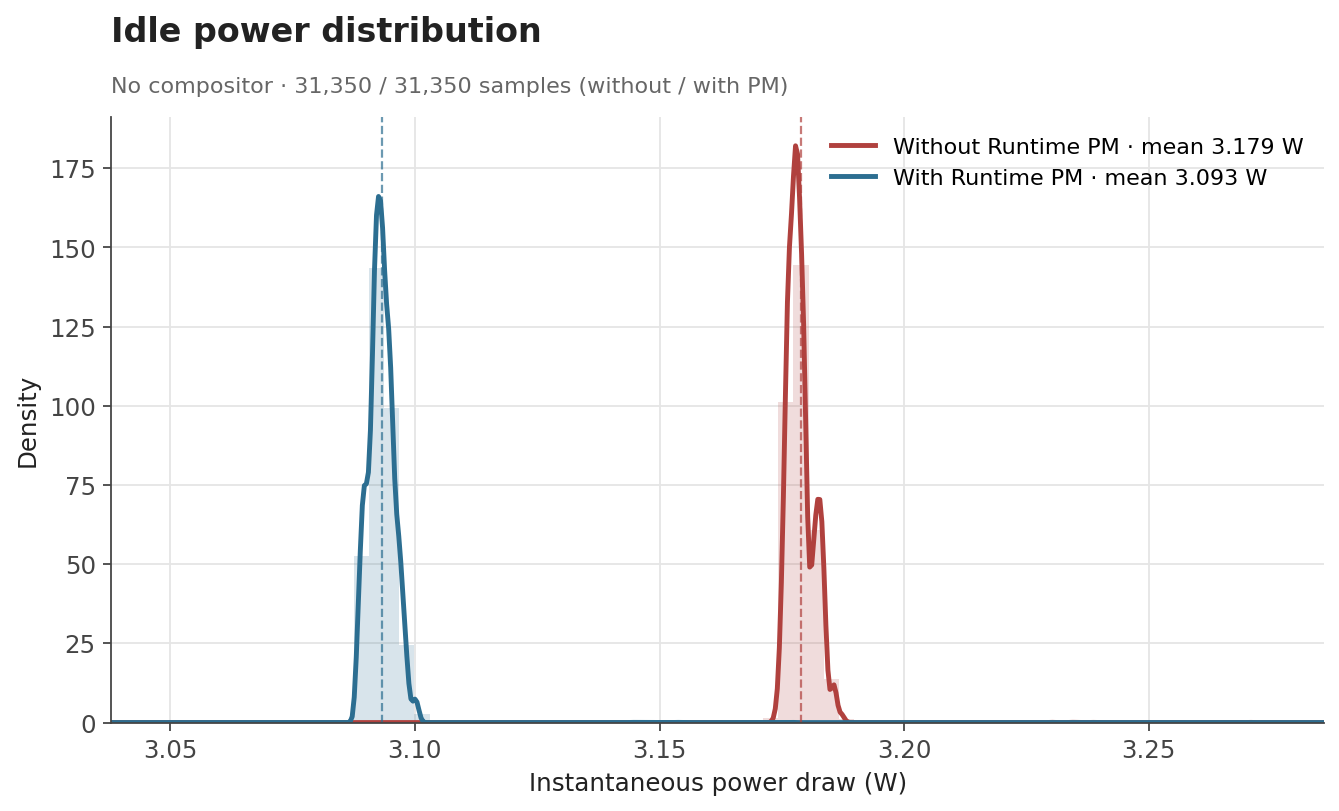
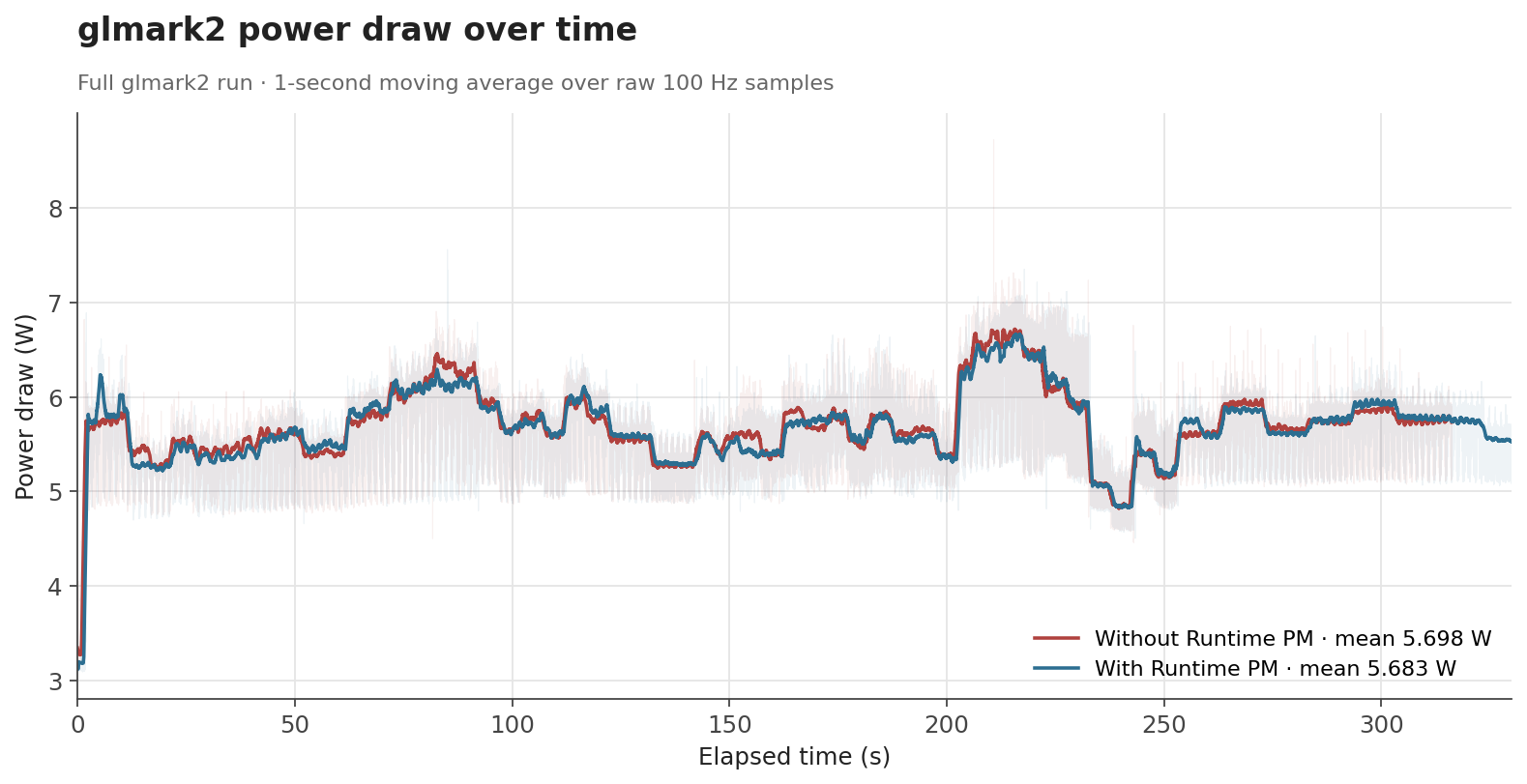
To evaluate the effect of Runtime PM, we measured the board’s power consumption with an external power meter in three scenarios: an idle desktop session with labwc running, an idle system without the compositor, and a full glmark2 run. Each condition was sampled at 100 Hz for around 300 seconds.
The first case represents a mostly idle graphical session, where labwc, the compositor used by Raspberry Pi OS, may still wake the GPU occasionally. The second is a baseline with no graphical workload, while the third is a sustained GPU benchmark intended to keep the GPU active.
The numbers behave the way one would hope. When the GPU is genuinely idle, the clock can be gated off and the savings show up as a clear drop: average draw falls from 3.30 W to 3.19 W with labwc running, and from 3.18 W to 3.09 W with no compositor at all. Both idle scenarios end up with savings of about 0.1 W (around 3%). Under glmark2, where the GPU is doing useful work for most of the run, the difference shrinks to about 0.015 W (0.3%), which is expected, as Runtime PM mainly affects the periods where the GPU becomes idle.
| Scenario | Before | After | Difference |
|---|---|---|---|
| Idle, compositor running | 3.300 W | 3.192 W | -0.108 W (-3.3%) |
| Idle, no compositor | 3.179 W | 3.093 W | -0.086 W (-2.7%) |
glmark2 full run |
5.698 W | 5.683 W | -0.015 W (-0.3%) |
The distribution of idle samples with labwc running also shows the effect clearly. With Runtime PM enabled, the distribution shifts toward lower power states. This indicates that the board spends more time in lower-power idle states once the V3D clock is no longer kept enabled unnecessarily.
The effect is even cleaner with no compositor running. The samples collapse into two very narrow peaks with no overlap between them: without Runtime PM, the board sits at a stable 3.18 W; with Runtime PM, it sits at a stable 3.09 W.
For glmark2, the time-series data shows that both configurations follow the same general workload pattern. Runtime PM does not significantly change the power profile while the GPU is busy, which is the intended behavior. The benefit appears when the workload leaves idle gaps or finishes, allowing the clock to be disabled again.
Overall, these measurements show that Runtime PM reduces power consumption where it matters most: when the GPU is idle. The absolute savings are modest at the board level, since the measurement includes the whole Raspberry Pi rather than the GPU power block alone, but the reduction is consistent with the intended change. The V3D clock no longer remains enabled for the full lifetime of the driver, and that translates into measurable reductions in idle power consumption.
Conclusion
Runtime PM support for V3D is one of those changes that is easy to overlook when everything is working correctly: userspace does not need to do anything differently, applications keep using the GPU as before, and the improvement happens underneath, in the way the kernel manages the hardware.
Beyond improving raw GPU performance, our work at Igalia is also about making the upstream graphics stack behave better as a system: more efficient when idle, more robust across firmware interfaces, and better aligned with the expectations of the Linux kernel infrastructure.
References
[2] clk: bcm: rpi: Maximize V3D clock - kernel/git/torvalds/linux.git - Linux kernel source tree